Performance-first RAW editing
Edit in the dark,
on purpose.
darkmoon is a fast, native RAW and JPEG editor built on Flutter for real cross-platform performance — and around a black canvas that doesn't fight your eyes at 1am, when the shadows in a photo are the whole point.
It is early: version 1.20, written by one person, and it will change a great deal. What is coming next is on this page, and so is what is missing.
RAW + JPEG · Windows 10 & 11 (64-bit) · €5.99 / month · macOS & Linux in beta


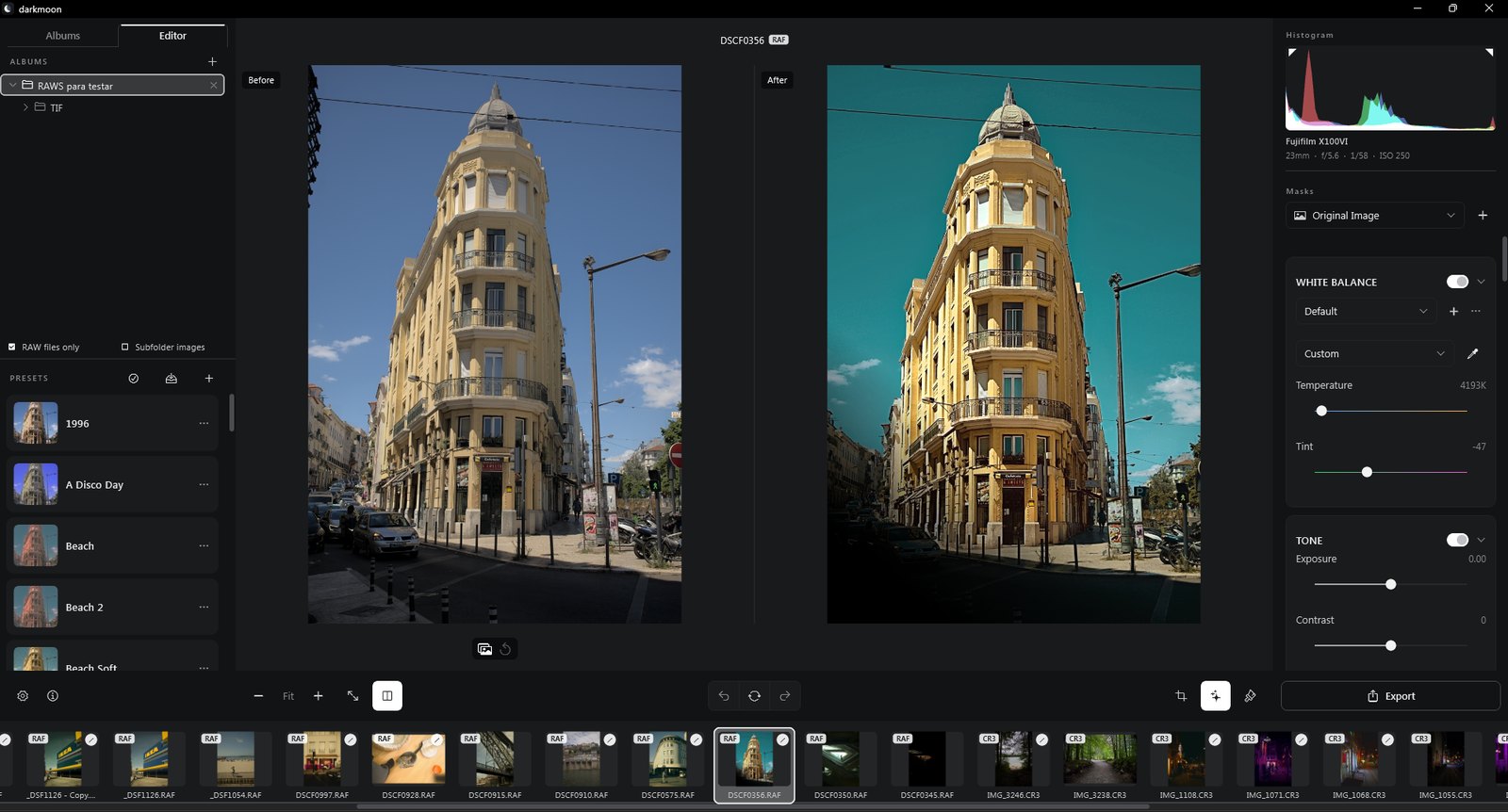
The real app, not a mockup — folder-tree library on the left, a full adjustment panel on the right, on a canvas that stays black at every stop.
What's inside
Everything a RAW workflow needs, none of the bloat.
Every adjustment renders through the same native pipeline, in isolates off the UI thread — so the panel stays responsive whether you're nudging Exposure or dragging a mask.
Every RAW that matters
Canon CR2/CR3, Nikon NEF, Sony ARW, Fujifilm RAF (X-Trans included), Olympus ORF, Panasonic RW2, and DNG — plus JPEG, PNG, TIFF, WebP and BMP through the exact same pipeline.
A complete professional toolkit
Tone, Presence, Detail, Tone Curve and per-channel Color Curves, an 8-band Color Mixer, Color Grading wheels, Crop & Transform, and four kinds of local masking.
Camera-aware white balance
Temperature and tint are read against the camera's own embedded calibration, not a generic guess — the exact white point your camera captured.
.xmp, both directions
Import .xmp presets — single files or .zip bundles — export your own, and blend any preset in at 0–150% instead of always applying it at full force.
Genuinely fast, not just responsive
The full-resolution render runs in parallel across every CPU core, with an optional GPU-accelerated path — a 40MP export that took 95 seconds now finishes in under 20. Built on Flutter, which compiles to real native code, not a webview, on every platform it targets.
Local by default, cloud if you ask for it
No darkmoon account, ever. Every edit — AI-assisted denoise and upscale included — runs on your machine by default and saves straight to a per-photo catalog on disk; an optional cloud path (bring your own Topaz key) is there only if you turn it on.
Pricing
One subscription, three machines, no account to make.
€5.99 a month, or once and for good. Plus VAT where your country charges it. Payment and invoicing are handled by Lemon Squeezy, who are the merchant of record — darkmoon never sees a card number.
Download
Free to download, and free to look through your photographs with. A licence is what lets you make a new edit and export it. Windows 10 and 11, 64-bit, about 1 GB.
Plus VAT where your country charges it. €59.99 for a year is two months off, and €69.99 once is the founder's licence — every version, for ever, at that price until 25 December 2026. Billed by Lemon Squeezy; cancel from your own account, any time.
Opening soon Buy darkmoon€99.99 €69.99
One payment, every version for ever, and no subscription to think about again. €69.99 until 25 December 2026, then €99.99: it is priced for the people who back something early, and that is the whole of the offer — the licence is the same one either way.
€5.99 a month
The whole application. Nothing is held back for a higher tier, and every update published while the subscription runs is included. Cancel whenever you like — it runs to the end of the month already paid for, and nothing is charged after that.
Three at a time
One key activates darkmoon on three computers — a desktop, a laptop, the machine at the studio. Moving to a fourth means releasing one of the three, which you do yourself, from inside the app or from your Lemon Squeezy account.
Fourteen days
If darkmoon is not what you wanted, write within fourteen days of the first payment and it is refunded in full, no explanation required. A photo editor either fits the way you work or it does not, and that is not something a feature list can tell you.
Made to work on a train
The licence is checked when darkmoon starts and once an hour while it is open, and darkmoon keeps working for thirty days without reaching the internet at all. Not being able to ask is never treated as a refusal — an outage on our side cannot lock out somebody who has paid.
Never locked out of your work
When a subscription stops, darkmoon does not. The library opens, the catalogue opens, and every edit you made stays readable; new edits and exporting are what switch off. Your photographs are yours, and a lapsed invoice is not a reason to stand between you and them.
Priced in euros, paid in yours
Everything is priced in euros and your bank converts at its own rate, adding whatever it charges for a purchase abroad. The figures below the price are today's conversion, for a sense of scale rather than a promise + M + the euro amount is the one that is charged.
A proper invoice, and VAT handled
Lemon Squeezy is the merchant of record, which means they work out the VAT for your country, collect it, and send you an invoice you can put in the books. A business number can go on it at checkout.
No darkmoon account
There is nothing to sign up for. Your key lives in your Lemon Squeezy account and on your own machine, and the one request darkmoon makes is that licence check. It sends the key and the name of the computer, and nothing about your photographs — see the privacy policy.
Windows 10 & 11, 64-bit, at launch · macOS and Linux builds are in beta and not sold yet · Licence agreement
Color Mixer & Grading
Push color the way a colorist would, not a filter.
Eight-band HSL adjustments and shadow / midtone / highlight / global color wheels sit next to a live histogram and the shot's own capture data — so every push is a decision, not a guess.

Comparing
See what you changed — or how far you are from the one that worked.
One button splits the canvas. On the left, the photograph before your edits; on the right, where it is now. The panel keeps working while it is open, so a slider moves and both halves answer.
And the left half does not have to be the same photograph. Point it at any other file — the shot from the set you already finished, a frame whose colour you are chasing — and edit against it side by side until the two agree. That is the part that makes a set of fifty look like it was taken on one afternoon.
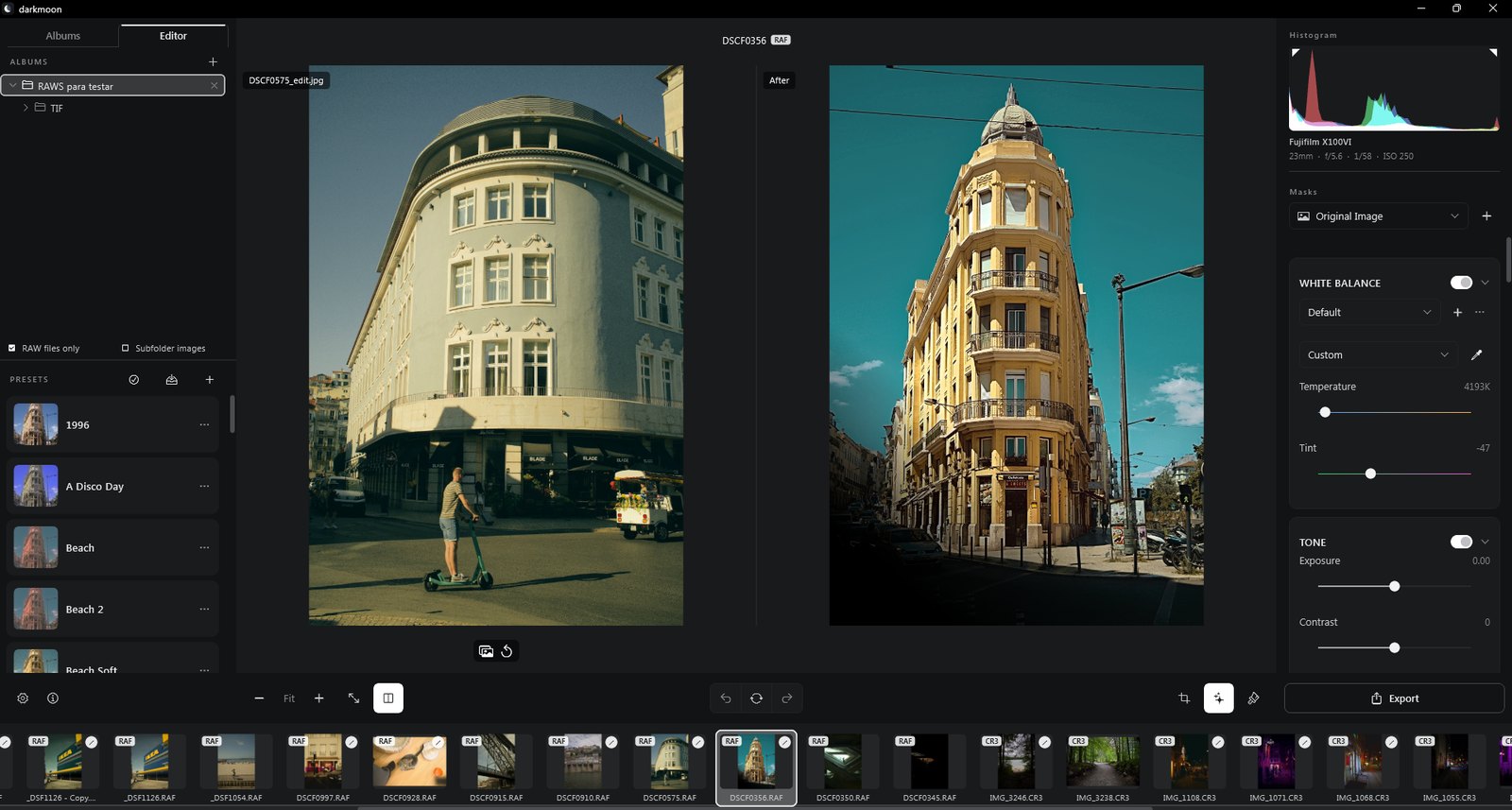
Comparing against another photograph instead of against the original — the reference on the left, the one being worked on to its right.
Organising
Drag a photograph where it belongs, and it goes there.
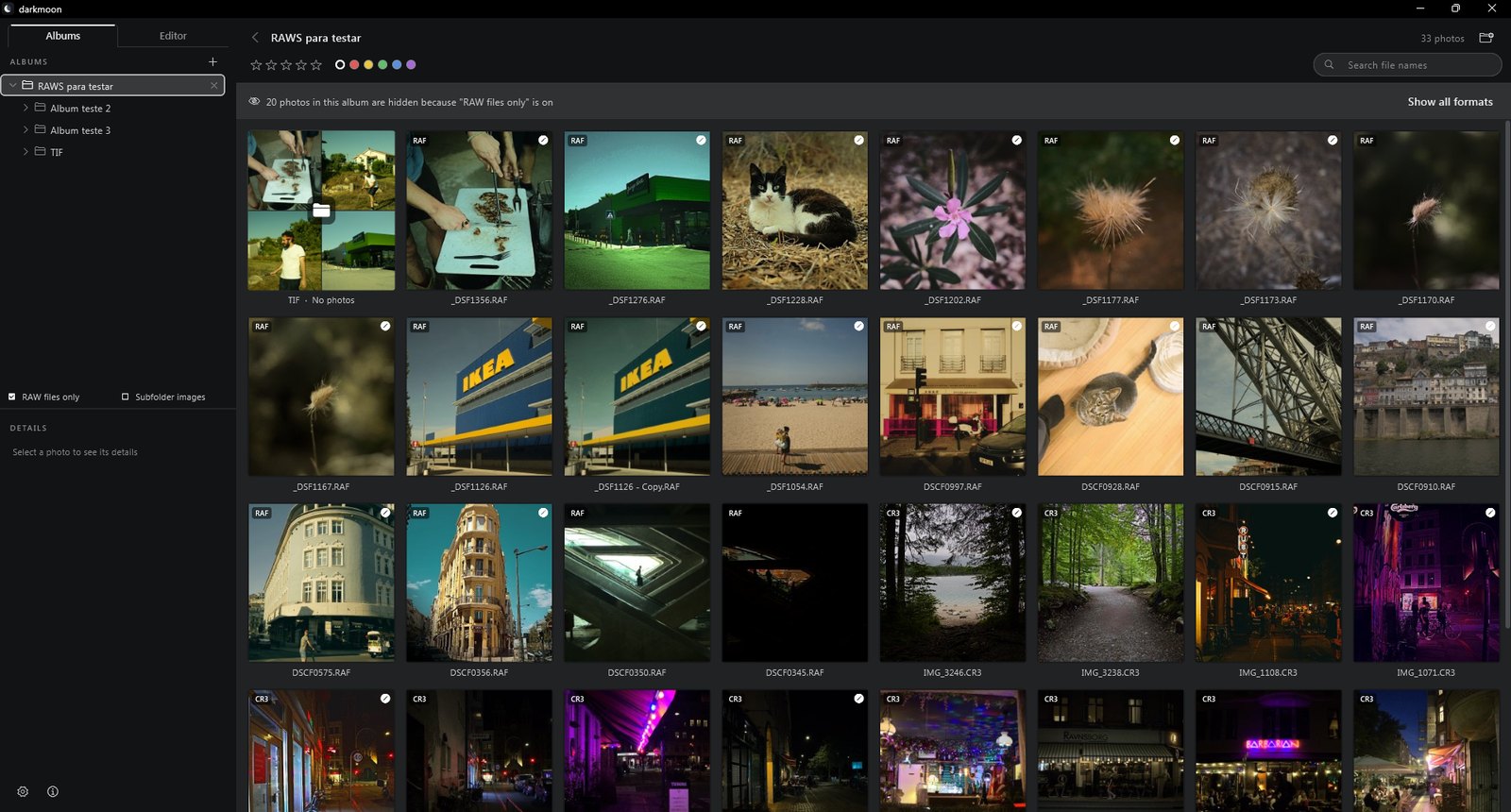
Filing is the part of a shoot nobody enjoys, so darkmoon does it the way a file manager does — by picking things up and putting them down. What moves on screen moves on disk.
Drop photographs on a folder
Drag from the grid onto any folder in the tree and the files move there — with their sidecars, and without overwriting anything that is already in it. Select a dozen first and the whole selection travels together.
Drop one photograph on another
Two pictures that belong together make an album out of themselves: drag one onto the other and darkmoon asks what to call it, then moves them both. The way you would stack prints on a table.
Move whole albums
Folders drag onto folders too, so a library that grew sideways can be reorganised without leaving the application — and a folder cannot be dropped inside itself, which is the mistake that makes people stop trusting a tree.
Where this is going
Early, and moving quickly.
darkmoon is written by one person and it is young. Things are missing, and some of what is here will change once photographers tell me what is wrong with it. That is the trade in buying something early: it is rougher than what it competes with, and it moves faster — a report on a Monday is often a release that week.
What follows is what I am working towards, in the order I expect to get to it. It is a list of intentions, not a set of dates or promises.
Generative fill, finished
Removing an object and having the photograph fill itself in. It is built and it works — on Stable Diffusion XL, on your own machine — and it is switched off in this release because it is not yet good enough on people. It comes back when it is.
Updates that arrive on their own
Today a new version means visiting this page. darkmoon should notice one exists and offer it, and say plainly what changed before you accept.
A download a tenth of the size
Most of the gigabyte you download is neural network weights. Fetching them on first run instead of bundling them takes the installer to about a hundred megabytes, for people who never use the AI features at all.
macOS and Linux, properly
Both are built from the same commit as Windows and both run, but neither has had the hours Windows has had. They come out of beta when somebody has used them for real work rather than when the tests pass.
More ways to organise
Folders for presets, batch operations across a selection, and the parts of album management that still send you out to Explorer.
darkmoon on a phone
An iPhone and Android version, wanted from the beginning and honestly a long way off: the raw decoder and the AI models have to be rebuilt for those processors, and a touch interface is a different design rather than this one made smaller. It is where this is going, not where it is.
Screen reader support
darkmoon's interface is invisible to assistive technology today, because of an open defect in the framework it is built on that crashes the application when the accessibility layer is on. It is being tracked upstream, and it is not forgotten.
And the small things
Most of what changes never reaches a list like this: a shortcut that was missing, a panel that scrolled when it should have stayed, a slider that fought the hand. Those are usually fixed the week they are reported, and they are most of the work.
What would you add?
This list is short because darkmoon is young, and what goes on it next is genuinely open. If something you rely on is missing, or something here is wrong for the way you work, say so — it is one person reading, and a good argument moves things up the list.
€5.99 a month
Your photos look better after dark.
€5.99 a month, €59.99 a year, or €69.99 once and for ever. Fourteen days to change your mind, whichever you pick.